Pro Tips for Smartphone Photos of Family and Holidays
Vacations, family reunions, and holiday get-togethers are special moments that don’t come around often—and the photos you take are what keep those memories alive. Whether you’re traveling with friends, gathering with family for a summer trip, or celebrating the holidays together, using your smartphone to capture every moment makes it easy to preserve the memories. With a simple workflow, you can collect and organize all your photos in one place and enjoy them for years to come.
1. Designate a Photo Organizer
Every gathering benefits from one person serving as the Photo Organizer. This doesn’t mean they take all the photos themselves. Instead, they’re responsible for collecting photos and videos from everyone, keeping them organized, and making sure nothing gets lost once the trip or holiday ends.
Having a single organizer prevents great photos from being scattered across multiple devices. Think of this role as the story curator—not the photographer—so your vacation, family reunion, or holiday get-together photos are preserved in one place.
2. Involve the Whole Group
Encourage everyone to contribute photos. Each person notices and captures something different—candid moments, meals, scenery, traditions, or quiet in-between moments.
A collaborative photo collection is richer and more complete than any single person could capture alone. Plus, it takes the pressure off one person to “get every shot.” These smartphone photo tips make it simple to involve everyone in preserving your shared memories.
3. Share Photos Easily Using AirDrop (iPhone Users)
Skip complicated cloud services or messy email attachments. AirDrop lets iPhone users send photos and videos directly to the Organizer’s phone quickly and without needing Wi-Fi.
AirDrop works best when iPhones are close together, and on newer iPhones, simply bringing devices near each other can make the AirDrop option appear automatically when sharing.
How to use AirDrop:
Go to Settings > General > AirDrop
Select Contacts Only or Everyone for 10 Minutes
Make sure Wi-Fi and Bluetooth are turned on
Select your photos or videos, tap Share, then choose AirDrop
Tip: Creating the trip, reunion, or holiday album in Photos before you arrive makes it easy to drop incoming AirDrop photos into the right place as you go.
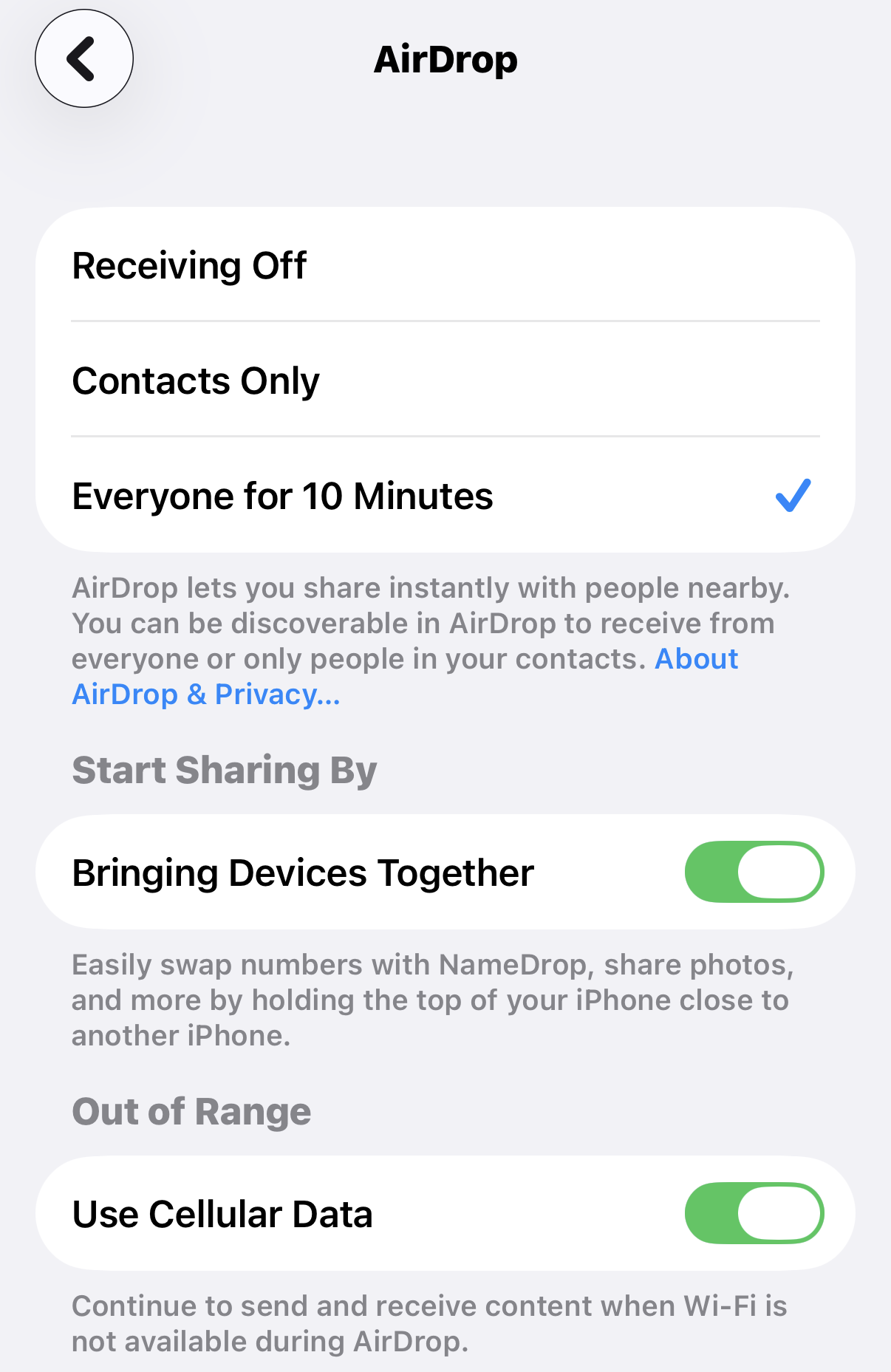
How to use AirDrop:
Go to Settings > General > AirDrop
Select Contacts Only or Everyone for 10 Minutes
Make sure Wi-Fi and Bluetooth are turned on
Select your photos or videos, tap Share, then choose AirDrop
3. Sharing Photos with Android Users
AirDrop is Apple-only, but mixed-device groups still have easy options. If your gathering includes both iPhones and Androids, consider:
A shared Google Photos album
A shared Google Drive folder
Free apps like Send Anywhere or Snapdrop
These tools enable everyone to contribute to your collaborative photo collection without encountering technical headaches.
Once photos are received, they appear in the Organizer’s Recents album—not in a specific album automatically. Moving them into a dedicated album regularly keeps your vacation, family reunion, or holiday get-together photos organized and prevents them from getting mixed in with everyday images.
Sharing photos at the end of each day or during downtime keeps the process manageable and ensures no special moments are forgotten.
What You’ll Have at the End
By the end of your vacation, family reunion, or holiday get-together, you’ll have a collaborative, well-rounded photo collection that truly reflects the experience—not just isolated snapshots.
From there, your photos are ready to become a photo book, a slideshow or video montage, or keepsake prints to share with family and friends. Best of all, no one spends the entire trip “being the photographer.”
By following these simple smartphone photo tips, your vacation, family reunion, or holiday get-together memories can be collected, organized, and enjoyed for years to come.
If you’d like help turning your photos into something meaningful that everyone will treasure, I’d love to help you take the next step.