The Real-World Guide to VPNs: When to Use It (and When to Lose It)
1. What is a VPN, Really?
Think of a VPN (Virtual Private Network) as a secure digital middleman.
The Tunnel: Usually, your data travels on an "open road" where your Internet Provider (and potentially hackers) can see your destination. A VPN puts your data in a secure, unmarked van that drives through a private tunnel.
The Encryption: Before your data leaves your device, the VPN wraps it in a layer of "gibberish." Even if a hacker on a cafe Wi-Fi intercepts it, they can’t read a single word.
The Mask: The VPN hides your "Digital Home Address" (IP Address). If you are sitting in Paris but connect to a New York server, the internet thinks you are physically in Manhattan.
2. The "Hybrid" Strategy: When to Click Connect
Treat a VPN as a travel tool, not a home appliance.
OFF at Home
At home, you are on a trusted network that you manage. Keeping a VPN on here can backfire:
Identity Crisis: Banks and government sites track your "Home IP." If you suddenly appear to be in a different city, they may freeze your account for fraud.
Device Connection: A VPN can "hide" your laptop from your smart TV or printer, making simple tasks frustrating.
ON While Traveling
The moment you step into an airport, hotel, or coffee shop, the rules change.
Public Wi-Fi is the "Wild West": You have no idea who is monitoring that router. A VPN ensures your passwords and banking logins stay encrypted.
The "Home Away From Home" Hack: If you are abroad and need to check your bank, connect to a VPN server in your home city. This tricks the bank into thinking you’re still on your couch, preventing account freezes.
3. Apple Private Relay vs. A Real VPN
If you use an iPhone and pay for iCloud+, you already have Private Relay. It’s great, but it has limits.
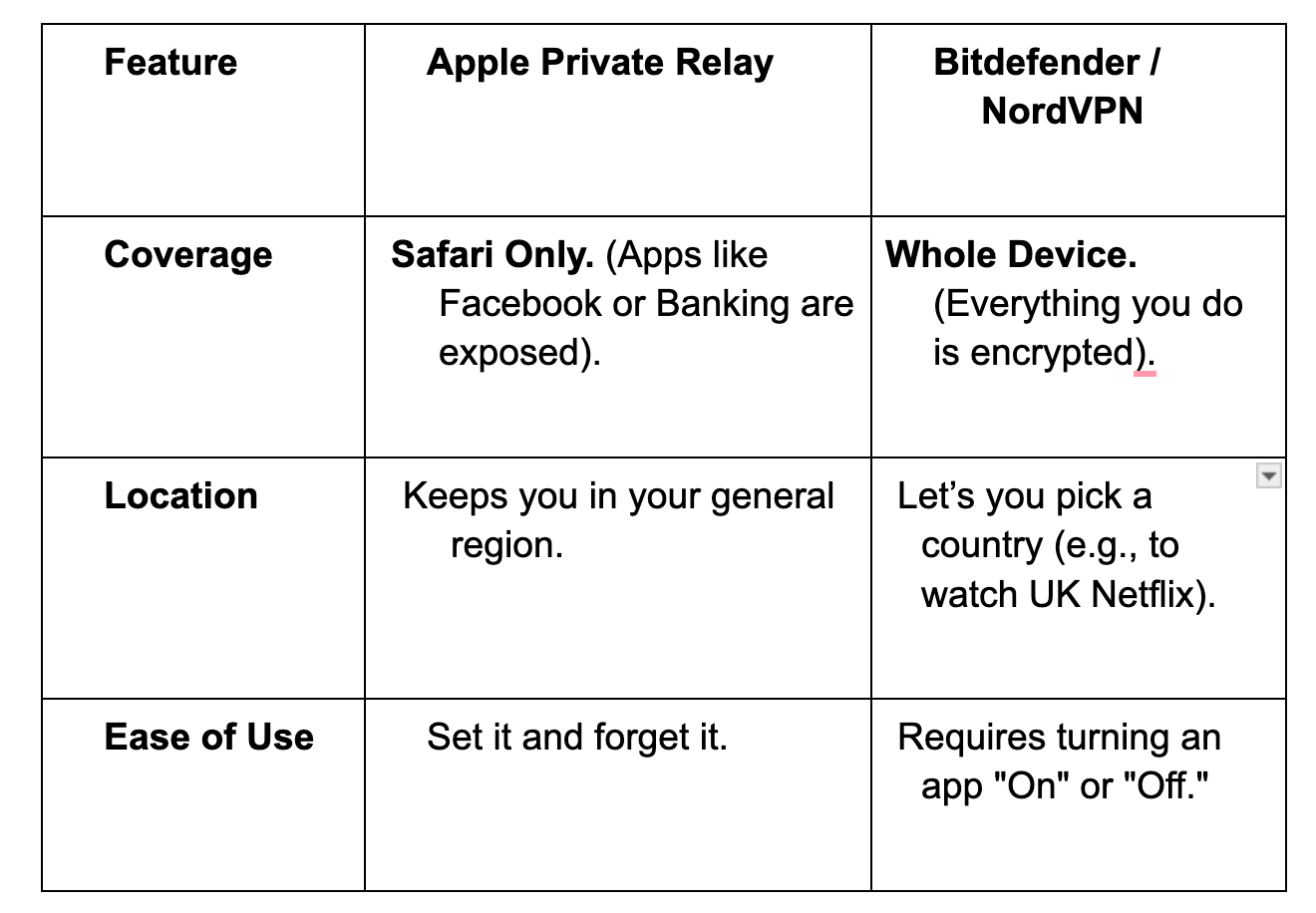
The Strategy: Leave Private Relay on for daily browsing at home. "Level up" to a real VPN the second you join a public Wi-Fi network to protect all your apps.
4. Which One Should You Buy? (March 2026 Prices)
If you are looking for a dedicated VPN, these are the two best options on the market right now.
Option A: Bitdefender VPN (The Budget Utility)
Best for those who want simple, no-frills security at the lowest price.
Cost: ~$2.92/mo ($34.99 for the first year).
Best For: Users who already have Bitdefender Antivirus or just want a "travel tool" for a great 1-year price.
Option B: NordVPN (The Swiss Army Knife)
Best for power users and travelers.
Cost: ~$3.39/mo (Requires a 2-year commitment).
Best For: Unblocking international streaming (Netflix/Hulu) and bypassing strict firewalls in countries like China.
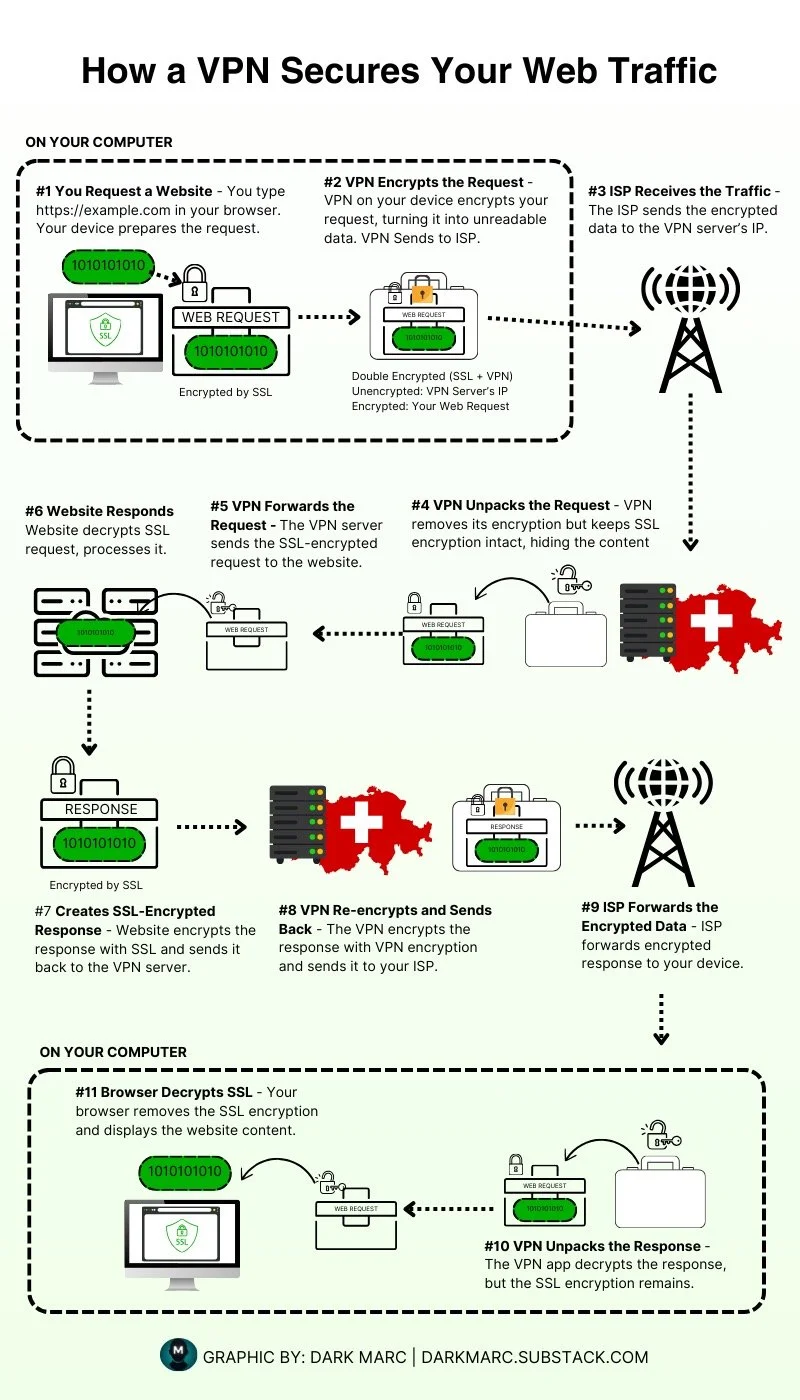
Graphic Credit to Dark Mark - Substacks - Darkmarc.substack.com
Summary: A VPN is a Tool, Not a Cage
You don't need to live your digital life behind a wall of encryption 24/7.
At Home: Prioritize speed and ease of identity.
On the Road: Prioritize stealth and security.
The goal isn't to be invisible to everyone—it's to be invisible to the wrong people.